Scheduler: Quick Access to customer file (View Client Details)
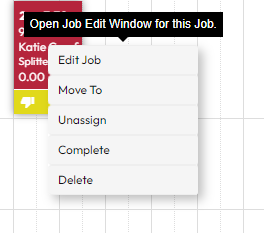
When on schedule and you click on the customer's job but only want to access their profile quicker there should be that option instead of having to click on edit job and then click on the customer profile which then opens another window.
Log in to comment and vote
Comments2
Keith Azzopardi
Sep 9, 2024
The Quick Access to Customer File feature has recently been completed and released.
This enhancement allows users to quickly and easily access the customer file directly from the job card. For more detailed information, you can view the release update here: Scheduler Update - Enhanced User Experience.
Keith Azzopardi
Mar 25, 2024
Hi @Border Pest Control
Great news! The feature you've been looking for is just around the corner. We're rolling out an update that allows you to quickly access a customer's profile right from the schedule with a single click. This will let you view client details immediately through an edit drawer that slides in smoothly from the side — no need to navigate through multiple steps anymore.
This improvement is part of our ongoing enhancements, similar to the User Edit Drawer feature we recently introduced. For a sneak peek at what you can expect, check out our latest release notes here.
We're excited to get this out to you, and we'll be sure to notify you as soon as it's live. Here's a sneak peak:
Thanks for your valuable suggestion — it's been a big part of making Formitize even better for everyone. Stay tuned!