Job Import Templates
Description:
Importing jobs via CSV files is a common task for many businesses.
The ability to save and reuse import settings, including field mappings, can significantly streamline this process.
This feature request aims to introduce templates for job imports, allowing users to save specific configurations and field mappings for future imports.
Current Workflow:
Currently, when importing jobs via a CSV file, users need to configure the import settings and field mappings each time, even if the field names in the CSV remain consistent across imports.
Proposed Solution:
Saveable Import Templates: Allow users to save their import configurations as templates. Once saved, these templates can be quickly applied to future imports, ensuring consistent field mappings and settings.
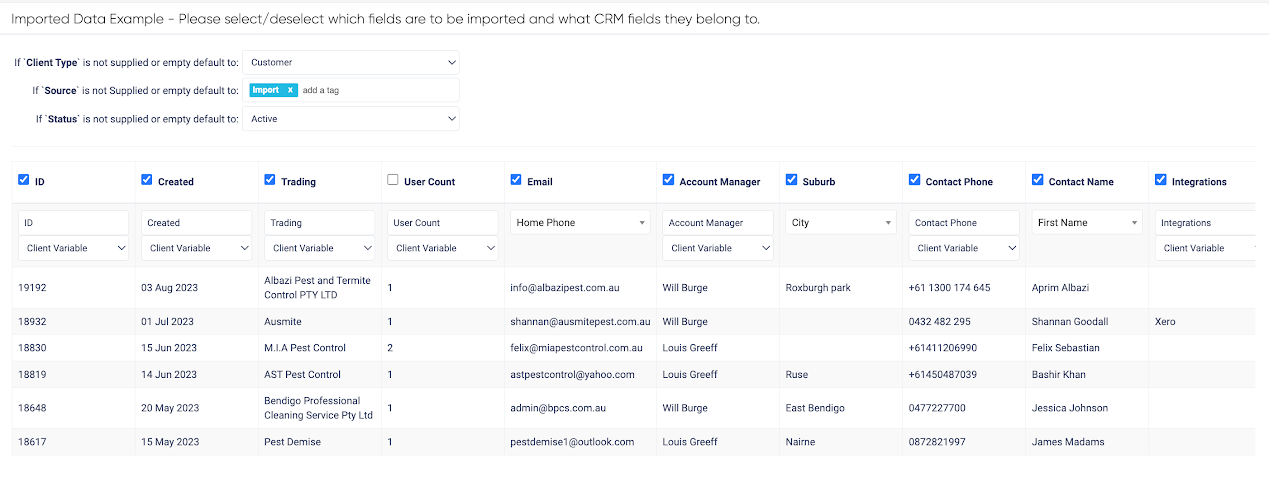
Field Matching: Introduce a feature that suggests matching fields based on the CSV's field names, similar to the CRM's import functionality. This would auto-populate form fields with saved selections, further simplifying the import process.
Visual Reference: Provide a visual representation or preview of the import, similar to the screenshot example from the CRM import. This would give users a clear understanding of how the data will be mapped and imported.
Additional Notes: This enhancement is inspired by similar functionalities observed in CRM systems. Implementing such a feature in Formitize would offer users a more intuitive and efficient way to handle job imports, especially for those who frequently import jobs from consistent data sources.
Log in to comment and vote
Comments1
Keith Azzopardi
Sep 14, 2023
Original Request from Customer:
Job Import Templates
Ability to save and re-use Job Import settings and fields as a template when importing Jobs via a CSV file. Field names remain the same when exported from CRM. Similarly the populating of Form fields with saved selections.