SETTINGS | Enable Location Custom Variables in Contact Filters
Summary:
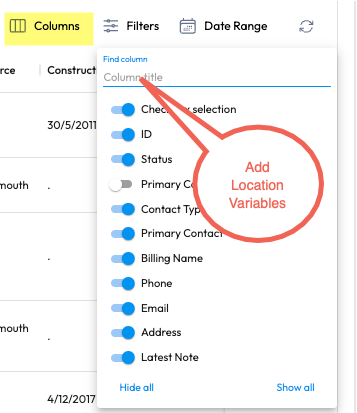
Enhance the Web Portal by enabling Location Custom Variables to be visible and filterable on the Contact page. Additionally, improve the flexibility of Custom Variables by introducing multiple choice options and conditional fields.
Features to be Implemented:
Location Custom Variables as Columns:
Enable the checkbox for Location Custom Variables to be shown as columns on the Contact page.
Allow these variables to be used in filters and searches.
Multiple Choice Custom Variables:
Add the option to create multiple choice custom variables instead of just text fields.
Ensure these options are easily selectable during contact creation and editing.
Conditional Custom Variables:
Implement conditional logic for custom variables.
Display relevant fields based on the input or selection of certain variables during contact creation.
Intended Outcome:
Improved data management by allowing users to filter and sort contacts using Location Custom Variables.
Increased flexibility and accuracy in capturing contact information with multiple choice and conditional custom variables.
Benefits:
Enhanced filtering and data segmentation capabilities.
Better customization to fit various business needs.
More intuitive and dynamic data entry process.
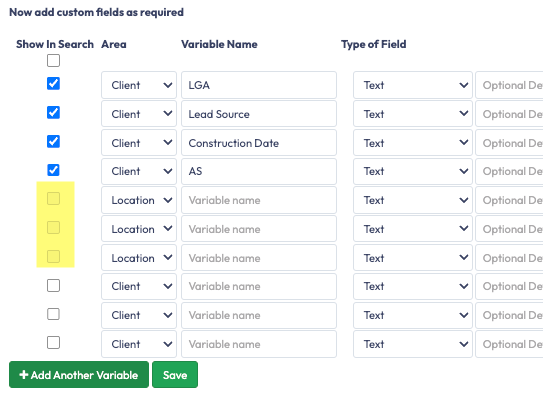
Additional Comments: Enable Location Custom Variables to become available in the Filters by Column Name. Currently, a portal user can enable Contact variables to show up in the filter, but Location Custom Variables cannot be enabled as the checkbox is greyed out.
Status: In Review
Log in to comment and vote
No comments yet
Be the first to share your thoughts.